
Skills.md
Skill Name
masterpiece-clone
Description
MasterPiece Clone — Transfer the visual style of a reference image to a target photo. This workflow analyzes the lighting, composition, textures, and aesthetic of a reference image, then applies those characteristics to transform your target photo into a stylistically consistent masterpiece.
It leverages the Pixify engine to process your inputs through:
- Style Analysis (image_to_text_gpt5)
- Style Transfer Generation (nano_banana_pro)
Service Overview
- 🌐 Product Website / Console:
https://ai.ngmob.com *(For product access, workflow management, and obtaining your API Key)*
- 🔗 API Base URL:
https://api.ngmob.com *(Used strictly for API requests and workflow execution)*
Use Cases
- Style Transfer: Apply the visual aesthetic of a high-end reference photo to your own images.
- Cinematic Enhancement: Transform standard photos into editorial-quality images with professional lighting and composition.
- Visual Consistency: Maintain a cohesive visual style across multiple photos for campaigns or portfolios.
- Creative Transformation: Reimagine your photos with the artistic direction of a reference image.
Inputs
| Name | Type | Required | Description |
|---|---|---|---|
| Image Input | string (URL) | ✅ | Reference image — The style/aesthetic you want to transfer (lighting, composition, mood) |
| Image Input 1 | string (URL) | ✅ | Target photo — The image you want to transform with the reference style |
⚠️ Important: Image Order Matters
- First parameter (Image Input): Reference image with the desired style
- Second parameter (Image Input 1): Target photo to be transformed
- Swapping these will produce different results
How to Use
When the user requests to execute this workflow, follow these steps:
1. Collect Input Parameters
Gather the required inputs from the user:
- A reference image showing the desired visual style
- A target photo to be transformed
2. Call the Workflow API
echo '{
  "inputs": {
    "Image Input": "https://example.com/reference-style.png",
    "Image Input 1": "https://example.com/target-photo.png"
  }
}' | curl -X POST https://api.ngmob.com/api/v1/workflows/Awtk0EnhqBGkoOExvseI/run \
  -H "Authorization: Bearer $API_KEY" \
  -H "Content-Type: application/json" \
  -d @-
3. Poll Task Status (Recommended: every 3–5 seconds)
Use the returned task_id to query task status:
curl https://api.ngmob.com/api/v1/workflows/executions/{task_id} \
  -H "Authorization: Bearer $API_KEY"
Preview
| Reference Style | Target Photo | Result |
|---|---|---|
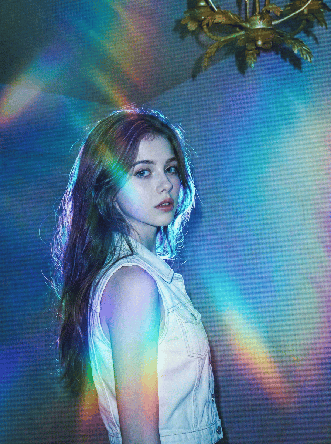 | 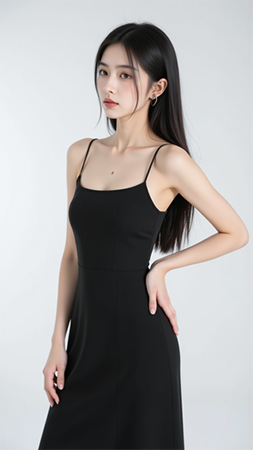 | 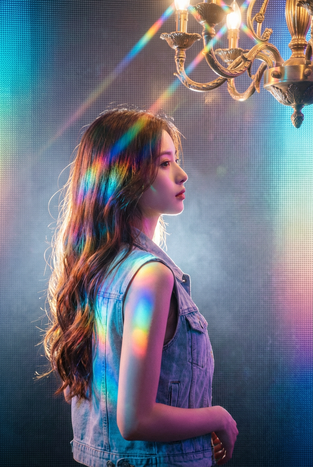 |
Example (Recommended)
{
  "Image Input": "https://example.com/reference-style.png",
  "Image Input 1": "https://example.com/target-photo.png"
}
What happens:
- The workflow analyzes the reference image's visual characteristics (lighting, color grading, composition style)
- It applies these characteristics to transform your target photo
- You receive a new image that maintains your subject while adopting the reference style
🤖 Generated with Pixify