

Special thanks to:
Warp, built for coding with multiple AI agents
Available for macOS, Linux and Windows
PDFMathTranslate
- What does this do?
科学PDF文档翻译保留布局。
- Recent Updates
- \[2026年3月23日\]使用隔离环境对v2.0翻译内核的实验支持(
--mode precise).(由 @瑞肯)
- \[2026年3月22日\]支持MiniMax(公关) @章鱼补丁)
- \[2026年3月22日\]修复OpenAI相关问题(PR由 @桑琴123)
- \[2026年3月22日\]修复HTTP相关问题(PR由 @soukouki)
- \[2026年3月22日\]在mac和OONX平台上更快地加载模型、启动GUI、打印版本和持续集成。(由 @瑞肯)
- \[2025年5月9日\]pdf2zh 2.0预览版 #586:Windows ZIP文件和Docker镜像现在可用。
> \[!注意\] > > 2.0移动到组织下的新存储库: PDFMathTranslate/PDFMathTranslate下一个 > > 2.0版本正式发布。
- Use 🌟
3.1 Online Service 🌟
您可以使用以下演示之一尝试我们的应用程序:
- 公共免费服务 在线无需安装 _(推荐)_.
- 沉浸式翻译-BabelDOC 免费使用配额;请参阅页面上的常见问题部分了解详细信息。 _(推荐)_
- 演示托管在HuggingFace上
- 在ModelScope上托管演示 无需安装。
请注意,演示的计算资源有限,请避免滥用。
3.2 Local Installation
对于不同的用例,我们提供了不同的方法来使用我们的程序:
3.2.1 Python: Install using uv
- 已安装Python(3.11\
3.2.2 Python: Install using pip
- 已安装Python(3.11\
3.3.3 Python: Graphic user interface
- 已安装Python(3.11\
3.2.4 Application: On Windows
- 从以下网址下载pdf2zh-version-win64.zip 发布页面
- 解压缩并双击
pdf2zh.exe跑步。
\[!提示\] - 如果您使用的是Windows,下载后无法打开文件,请安装 vc_redist.x64.exe 然后再试一次。
3.2.5 Reference manager: Zotero Plugin
看 Zotero PDF2zh 了解更多详情。
3.2.6 Docker: Containerized Deployment
- 拉动并运行:
   docker pull byaidu/pdf2zh
docker run -d -p 7860:7860 byaidu/pdf2zh- 在浏览器中打开:
http://localhost:7860/对于云服务上的docker部署:
\[!提示\] - 如果您无法访问Docker Hub,请尝试在 . ``bash docker pull ghcr.io/byaidu/pdfmathtranslate docker run -d -p 7860:7860 ghcr.io/byaidu/pdfmathtranslate ``3.2.* Solutions for network issues in installation
特定地区的用户在加载AI模型时可能会遇到网络问题。当前程序依赖于AI模型(wybxc/DocLayout-YOLO-DocStructBench-onnx),由于这些网络问题,一些用户无法下载。
要解决下载此模型的问题,请使用以下环境变量作为解决方法:
set HF_ENDPOINT=https://hf-mirror.com对于PowerShell用户:
$env:HF_ENDPOINT = https://hf-mirror.com如果解决方案对您不起作用/您遇到了其他问题,请参阅 常见问题.
- Technical Details
4.1高级选项
在命令行中执行翻译命令以生成翻译后的文档 example-mono.pdf 以及双语文件 example-dual.pdf 在当前工作目录中。使用谷歌作为默认翻译服务。更多支持翻译服务可以找到 这里.
在下表中,我们列出了所有高级选项以供参考:
| 选项 | 功能 | 示例 |
|---|---|---|
| 文件 | 本地文件 | pdf2zh ~/local.pdf |
| 链接 | 在线文件 | pdf2zh http://arxiv.org/paper.pdf |
-i | 进入GUI | pdf2zh -i |
-p | 部分文档翻译 | pdf2zh example.pdf -p 1 |
-li | 源语言 | pdf2zh example.pdf -li en |
-lo | 目标语言 | pdf2zh example.pdf -lo zh |
-s | 翻译服务 | pdf2zh example.pdf -s deepl |
-t | 多线程 | pdf2zh example.pdf -t 1 |
-o | 输出目录 | pdf2zh example.pdf -o output |
-f, -c | 异常 | pdf2zh example.pdf -f "(MS.*)" |
-cp | 兼容模式 | pdf2zh example.pdf --compatible |
--skip-subset-fonts | 跳过字体子集 | pdf2zh example.pdf --skip-subset-fonts |
--ignore-cache | 忽略翻译缓存 | pdf2zh example.pdf --ignore-cache |
--share | 公共链接 | pdf2zh -i --share |
--authorized | 授权 | pdf2zh -i --authorized users.txt [auth.html] |
--prompt | 自定义提示 | pdf2zh --prompt [prompt.txt] |
--onnx | \[使用自定义DocLayout YOLO ONNX型号\] | pdf2zh --onnx [onnx/model/path] |
--serverport | \[使用自定义WebUI端口\] | pdf2zh --serverport 7860 |
--dir | \[批量翻译\] | pdf2zh --dir /path/to/translate/ |
--config | 配置文件 | pdf2zh --config /path/to/config/config.json |
--serverport | \[自定义gradio服务器端口\] | pdf2zh --serverport 7860 |
--mode | 翻译模式: fast (默认值,v1)或 precise (v2,实验性,需要pdf2zh_next子模块) | pdf2zh --mode precise example.pdf |
--babeldoc | 使用实验后端 巴贝尔多克 翻译 | pdf2zh --babeldoc -s openai示例.pdf |
--mcp | 启用MCP STDIO模式 | pdf2zh --mcp |
--sse | 启用MCP SSE模式 | pdf2zh --mcp --sse |
有关详细说明,请参阅我们的文档 高级用法 查看每个选项的完整列表。
4.2 Downstream Development
For downstream applications, please refer to our document about API Details for further information about:
- Python API,如何在其他Python程序中使用该程序
- HTTP API,如何与安装了程序的服务器通信
4.3 Differences between two major forks
- Byaidu/PDFMathTranslate:目前和原项目稳定发布。
- PDFMathTranslate/PDFMathTranslate下一个:一个带有web用户界面和其他功能的fork。该分支处理了大量边缘情况,提高了PDF兼容性,优化了跨列和跨页语义一致性、动态缩放和动态缩放一致性,以及许多其他翻译质量改进。然而,这个分叉仅用于开发,不解决兼容性问题,也不是为社区贡献而设计的。
- Project Information
5.1 Citation
这项工作已被接受 *2025年自然语言处理实证方法会议论文集:系统演示* (EMNLP 2025)。
引用:
@inproceedings{ouyang-etal-2025-pdfmathtranslate,
	    title = "{PDFM}ath{T}ranslate: Scientific Document Translation Preserving Layouts",
	    author = "Ouyang, Rongxin  and
	      Chu, Chang  and
	      Xin, Zhikuang  and
	      Ma, Xiangyao",
	    editor = {Habernal, Ivan  and
	      Schulam, Peter  and
	      Tiedemann, J{\"o}rg},
	    booktitle = "Proceedings of the 2025 Conference on Empirical Methods in Natural Language Processing: System Demonstrations",
	    month = nov,
	    year = "2025",
	    address = "Suzhou, China",
	    publisher = "Association for Computational Linguistics",
	    url = "https://aclanthology.org/2025.emnlp-demos.71/",
	    pages = "918--924",
	    ISBN = "979-8-89176-334-0",
	    abstract = "Language barriers in scientific documents hinder the diffusion and development of science and technologies. However, prior efforts in translating such documents largely overlooked the information in layouts. To bridge the gap, we introduce PDFMathTranslate, the world{'}s first open-source software for translating scientific documents while preserving layouts. Leveraging the most recent advances in large language models and precise layout detection, we contribute to the community with key improvements in precision, flexibility, and efficiency. The work is open-sourced at https://github.com/byaidu/pdfmathtranslate with more than 222k downloads."
	}
5.2 Acknowledgement
- 新后端: 巴贝尔多克
- 文档合并: PyMuPDF
- 文档解析: Pdfminer.six
- 文档提取: 矿工
- 文档预览: Gradio PDF
- 多线程翻译: 数学翻译
- 布局解析: YOLO文档布局
- 多语言字体: Go Noto Universal
5.3 Contributors
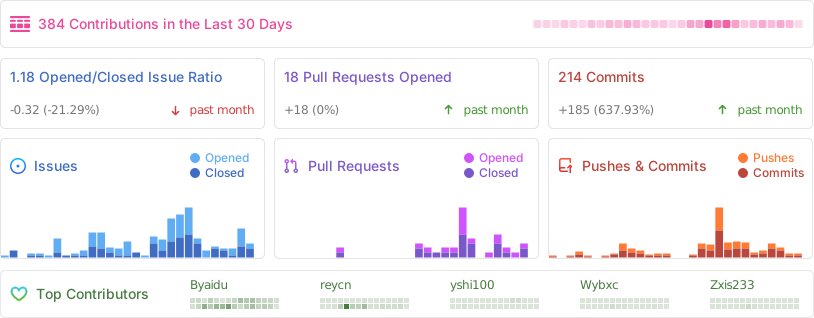
有关如何捐款的详细信息,请咨询 贡献指南.
5.4 Star History